As browsers move to limit third-party cookies and tracking, conventional federated identity flows which require third-party cookies can cause privacy and compatibility issues. FedCM (Federated Credential Management) addresses this by letting the browser mediate the communication between the Identity Provider (IdP) and the Relying Party (RP) so that federated sign-in can be performed without third-party cookies.
I’ll explain how this works with a demo, what an IdP and an RP need to implement, and what distinguishes it from OAuth/OIDC.
Why FedCM exists
Federated sign-in generally relies on OAuth/OIDC redirects or IdP iframes embedded on the RP’s page. These iframes needed to read the IdP’s first-party cookie from a third-party context in order to determine if the user was already signed in. As browsers phase out third-party cookies and prevent cross-site tracking, this breaks eventually. But, simply removing third-party cookies is not an option, because federated sign-in is legitimate use case.
FedCM idea is by moving the identity handshake into the browser. This way the browser mediates the sign-in flow, keeping the RP and IdP isolated from each other’s cookies, while providing a seamless sign-in experience.
From a user’s POV, this is like replacement for OAuth/OIDC sign-in. But, it’s not. FedCM does not use PKCE, state, refresh tokens, the authorization code flow, or other OAuth/OIDC protocol mechanisms. Also, it is not a part of OAuth or OpenID Connect and was not designed to replace their security model. But, it is browser API that complements existing identity protocols by providing a more privacy preserving way to initiate federated sign-in.
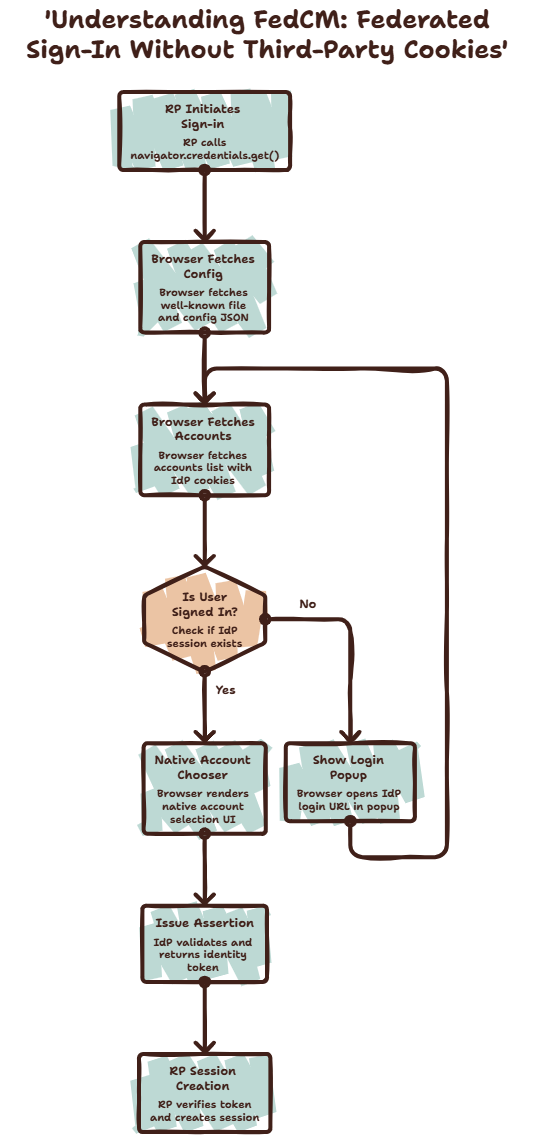
The three parties, and what each one is allowed to see
FedCM has three parties, and the goal is: have no direct communication. Everything is done through the browser.
- RP (Relying Party): the site which user signs into. It calls
navigator.credentials.get()and has no communication with the IdP. - IdP (Identity Provider): the account authority. It exposes a set of well-known JSON endpoints, and has no communication with the RP.
- The browser: does actual fetches (attaching IdP’s own first-party cookies, since from the browser’s point of view it’s a first-party request), and has a native account chooser rendered outside either page’s DOM. No page can style it, script it, screenshot it.
graph LR
  subgraph RP origin
    SP["SP page JS<br/>navigator.credentials.get()"]
  end
  subgraph Browser
    FedCM["FedCM internals<br/>(account chooser UI)"]
  end
  subgraph IdP origin
    IdPEndpoints["well-known / config /<br/>accounts / assertion /<br/>client_metadata / disconnect"]
  end

  SP -- "1 . request identity" --> FedCM
  FedCM -- "2 . credentialed fetches" --> IdPEndpoints
  IdPEndpoints -- "3 . accounts + token" --> FedCM
  FedCM -- "4 . resolves promise with token" --> SP
vocabulary
| Term | Meaning |
|---|---|
client_id | How the IdP identifies the RP. Some IdPs issue real client IDs; |
| Config URL | The IdP’s single JSON document (/fedcm.json) listing all its other endpoint URLs. |
| Well-known file | /.well-known/web-identity, fetched without credentials, must not redirect. Proves the IdP origin actually owns the config URL. |
| Mediation | How much the browser can do without a user action. "optional" (default) shows UI if needed; "silent" fails instead of showing UI, which is what auto re-authentication on return visits depends on. |
| Grant / consent | The record that a specific user agreed to share their profile with a specific RP. Decides whether browser can skip the “Continue as ___” screen, and whether silent mediation can succeed at all. |
| Login Status API | A signal the IdP sends the browser (via the Set-Login response header) meaning “a user is/isn’t signed in to me right now.” Lets the browser skip the accounts fetch entirely when it already knows. |
| Quiet period | An anti-abuse cooldown after any sign-in. Silent mediation keeps failing for a while afterward even with a valid grant, so a site can’t chain silent get() calls to repeatedly probe “is this user still logged in.” |
IdentityCredential.disconnect() | The RP-initiated API for revoking its own grant. Similar to an OAuth app revoking its own token. |
Why so many separate endpoints
At first, five endpoints for single sign-in flow feels excessive. But each endpoint has different trust level and access to different information, this allows the browser to enforce different security and privacy rules.
- Uncredentialed, no RP context (well-known, config): This will be fetched before the browser knows which RP is requesting them. They simply answer, “Does this IdP exist, and how is it configured?”
- Uncredentialed, RP-aware (client metadata): The response isn’t sensitive, but the request includes the RP’s identity. That’s why newer Chrome and Edge versions require the well-known file to pin
accounts_endpointandlogin_url, preventing an IdP from quietly serving RP-specific account endpoints as a tracking mechanism. - Credentialed, not RP-aware (accounts): This request includes the IdP’s session cookie but deliberately hides which RP is asking. That prevents the IdP from tailoring the account list per RP in a way that could be used for fingerprinting.
- Credentialed, RP-aware, mutating (assertion, disconnect): These endpoints need to know the RP so the IdP can issue or revoke a grant. Both are
POSTrequests and only run after explicit user action—either selecting an account or disconnecting the RP.
Building the IdP: endpoint by endpoint
An IdP under FedCM is really just a normal web app (login form, sessions, user table) plus a some JSON endpoints the browser calls on RP’s behalf. Here’s the order the browser actually calls them in.
/.well-known/web-identity, proving ownership of config URL. An RP could pointnavigator.credentials.get()at any configURL, including one it doesn’t own, to trick the browser into treating some other site as an IdP. The well-known file (fetched from the IdP’s own origin, no credentials, must not redirect) is the IdP saying “yes, this config URL is mine.” Newer Chrome/Edge also requireaccounts_endpointandlogin_urlhere, not just inside the config JSON, whenever the IdP serves aclient_metadata_endpointtoo:
{
  "provider_urls": ["http://localhost:8080/fedcm.json"],
  "accounts_endpoint": "http://localhost:8080/fedcm/accounts",
  "login_url": "http://localhost:8080/login"
}
/fedcm.json, the config document. One place listing every other endpoint plus the branding shown in the account chooser (background color, icon). Fetched without credentials.
{
  "accounts_endpoint": "http://localhost:8080/fedcm/accounts",
  "client_metadata_endpoint": "http://localhost:8080/fedcm/client_metadata",
  "id_assertion_endpoint": "http://localhost:8080/fedcm/assertion",
  "disconnect_endpoint": "http://localhost:8080/fedcm/disconnect",
  "login_url": "http://localhost:8080/login",
  "branding": { "background_color": "#1a73e8", "color": "#ffffff" }
}
/fedcm/client_metadata, per-RP disclosure links. The account chooser shows a privacy policy / terms link so user knows what they’re agreeing to. Fetched uncredentialed, but with knowledge of whichclient_idis asking, which is exactly why the well-known file’s stricter pinning requirement exists (see above). This one also needsAccess-Control-Allow-Originsince, unlike the other FedCM endpoints, it’s subject to normal CORS./fedcm/accounts, who’s signed in, credentialed. This is the one request where the browser attaches the IdP’s session cookie, so the IdP answers “which account(s) does this browser currently have a session for.” Deliberately not RP-aware, as seen above. No session cookie means a plain 401, and that matters more than it looks: it’s what makes the Login Status API’s mismatch handling work. If the IdP claimed “logged-in” but accounts says otherwise, the browser corrects itself.- With a session, the response includes
approved_clients: everyclient_idthis user has an active grant for. That list is what lets a returning user skip the “Continue as ___” consent screen, since the browser checks whether the requesting RP is already in it.
- With a session, the response includes
{
  "accounts": [
    {
      "id": "1",
      "name": "Alice Adams",
      "email": "alice@example.com",
      "approved_clients": [
        "http://localhost:8081"
      ]
    }
  ]
}
/fedcm/assertion, issuing the token. Once the user picks an account in the native chooser, the browser POSTs here (credentialed, form-encoded) to get a token back. The handler needs to:- Validate
Sec-Fetch-Dest: webidentityand checkOriginagainst the RP it expects. A real multi-tenant IdP would look this up perclient_idinstead of hardcoding a single origin. - Re-check the session cookie, since the user still has to be signed in.
- Read
account_id,client_id,noncefrom the form, and cross-checkaccount_idagainst the signed-in user, so a client can’t assert a token for an account it didn’t actually pick. - Issue a JWT:
issis the IdP origin,subis the account id,audis theclient_id, plus profile claims and the nonce. - Record a grant, so future
accountsresponses include this RP inapproved_clients. - Return
{"token": "<jwt>"}.
Error responses use the FedCM-specified shape,
{"error": {"code": "access_denied", "url": ""}}, so the browser can surface something meaningful instead of a bare network failure.- Validate
The login page and the Login Status API. The browser needs to know, before it even tries the accounts endpoint, whether the IdP thinks anyone is signed in. Otherwise every page load on every site would need to speculatively hit every known IdP’s accounts endpoint, which doesn’t scale. The Login Status API is the IdP proactively telling the browser “a user just signed in / signed out here,” through the
Set-Loginresponse header.GET /loginis a normal HTML form, opened by the browser in a popup when it wants a sign-in but has no session yet.POST /login, on success, creates a session, sets the session cookie, and setsSet-Login: logged-in. The response body is a tiny page whose script callsIdentityProvider.close(), telling the browser “the popup’s done, close it and retry the accounts fetch.”window.IdentityProviderexists on every page, not just the popup, so callingclose()from a normal top-level navigation just silently no-ops.POST /logoutclears the session and sendsSet-Login: logged-out.
/fedcm/disconnect, RP-initiated revocation. Lets an RP callIdentityCredential.disconnect()to unlink itself from a user’s IdP account (an “unlink your Google account” button) without a separate settings UI on the IdP side. Same origin andSec-Fetch-Destchecks as assertion, then it deletes the grant row and returns{"account_id": "..."}.There’s a second way to reach the same grant: a plain account home page on the IdP itself, listing every RP the user granted access to, with its own “Revoke” button. That’s ordinary form-based self-service, not part of the FedCM API at all, just a normal UI over the same grants table.
CORS is the part that’s easy to get wrong. Even though the credentialed endpoints (
accounts,assertion,disconnect) and client metadata are invoked internally by the browser, not by a page’sfetch(), they’re still subject to real CORS checks in current Chrome/Edge. Every one of them, including error responses, needs:
Access-Control-Allow-Origin: http://localhost:8081   (the exact RP origin, not *)
Access-Control-Allow-Credentials: true               (only on the credentialed ones)
Building the RP: what’s actually needed
The RP side is much simpler. From the IdP’s perspective, the RP is just a client_id, and there are no FedCM-specific server endpoints the RP has to implement. Everything FedCM-related happens in the browser. The backend only needs to verify the token it receives and create a normal cookie session.
How to Request credential:
navigator.credentials.get({
  identity: {
    providers: [{
      configURL: "http://localhost:8080/fedcm.json",
      clientId: "http://localhost:8081",
      params: { nonce: crypto.randomUUID() },
    }],
  },
  mediation, // "optional" or "silent"
});
Here RP only needs to know the IdP’s configURL and its own clientId. Everything else comes from the IdP’s config document. The nonce passed via params, and this single call triggers the entire browser-managed FedCM flow.
note: Only one navigator.credentials.get() request can be active per page. Starting another before the first finishes throws NotAllowedError. The usual fix is to use an AbortController and cancel the previous request before starting a new one.
Silent auto re-authentication: Using mediation: "silent" lets the browser sign the user in without showing any UI. This only succeeds when:
- the user has already granted access to the RP,
- exactly one matching account exists, and
- the browser isn’t in its post-sign-in quiet period.
If any of these conditions fail, the promise simply rejects. The expected behavior is to catch the error and fall back to showing the sign-in button.
Exchanging the token for a session: When navigator.credentials.get() resolves, it returns an IdentityCredential whose .token is whatever the IdP’s id_assertion_endpoint returned. The RP sends this token to its backend, verifies the JWT signature, checks that the aud claim matches the RP’s origin, and then creates a normal session cookie. From that point on, authentication works like any other cookie-based session.
Disconnecting: To revoke access, call IdentityCredential.disconnect({ configURL, clientId }). Unlike sign-in, this is a static method, not part of navigator.credentials. The browser sends a credentialed request to the IdP’s disconnect_endpoint. After that succeeds, the RP should also clear its own session cookie, since disconnecting only revokes the FedCM grant, it does not log the user out of the RP.
What the RP doesn’t need: The RP doesn’t need any FedCM-specific server APIs, CORS configuration, knowledge of the IdP’s cookies or user database, or a revocation webhook. If the user revokes access at the IdP, future navigator.credentials.get() calls simply stop returning a token. The RP detects this naturally during the next sign-in attempt.
The four flows, end to end
With both sides ready, here’s how the flows works together. “Browser (FedCM)” below is browser’s internal machinery: the account chooser and the fetches it makes on the RP’s behalf.
First-time sign-in (no existing IdP session, no prior grant):
sequenceDiagram
    actor User
    participant SP as SP page JS
    participant FedCM as Browser (FedCM)
    participant IdP as IdP server

    User->>SP: Click "Sign in with Demo IdP"
    SP->>FedCM: navigator.credentials.get({mediation:"optional"})
    FedCM->>IdP: GET /.well-known/web-identity (no creds)
    IdP-->>FedCM: provider_urls, accounts_endpoint, login_url
    FedCM->>IdP: GET /fedcm.json (no creds)
    IdP-->>FedCM: config (accounts/assertion/disconnect/login_url)
    FedCM->>IdP: GET /fedcm/accounts (with IdP cookies)
    IdP-->>FedCM: 401 (no session yet)

    FedCM->>User: "Continue to IdP to sign in" prompt
    User->>FedCM: Clicks continue
    FedCM->>IdP: opens login_url in popup (GET /login)
    IdP-->>User: login form
    User->>IdP: POST /login (username, password)
    IdP-->>FedCM: Set-Cookie: idp_session, Set-Login: logged-in<br/>page calls IdentityProvider.close()
    FedCM->>FedCM: closes popup

    FedCM->>IdP: GET /fedcm/accounts (retry, with cookie)
    IdP-->>FedCM: 200 {accounts:[{id, name, email, ...}]}
    FedCM->>IdP: GET /fedcm/client_metadata
    IdP-->>FedCM: privacy_policy_url, terms_of_service_url

    FedCM->>User: native account chooser UI
    User->>FedCM: picks account
    FedCM->>IdP: POST /fedcm/assertion (account_id, client_id, nonce)
    IdP->>IdP: verify origin, issue JWT, store grant
    IdP-->>FedCM: {token: "<jwt>"}
    FedCM-->>SP: credentials.get() resolves {token}

    SP->>SP: POST /session {token} (same-origin)
    SP->>SP: verify JWT, set sp_session cookie
    SP-->>User: redirect to /profile
Returning user, silent auto re-authentication:
sequenceDiagram
    actor User
    participant SP as SP page JS
    participant FedCM as Browser (FedCM)
    participant IdP as IdP server

    User->>SP: loads the RP homepage
    SP->>FedCM: navigator.credentials.get({mediation:"silent"})
    FedCM->>IdP: GET /fedcm/accounts (IdP cookie still valid)
    IdP-->>FedCM: 200 {accounts:[{..., approved_clients:[...]}]}

    alt grant present, one match, not in quiet period
        FedCM->>IdP: POST /fedcm/assertion (no UI shown)
        IdP-->>FedCM: {token}
        FedCM-->>SP: resolves {token}
        SP->>SP: POST /session, set cookie
        SP-->>User: redirect to /profile (no click needed)
    else quiet period active / no grant / multiple accounts
        FedCM-->>SP: rejects (NotAllowedError)
        SP-->>User: shows "Sign in with Demo IdP" button
    end
Disconnect, RP-initiated:
sequenceDiagram
    actor User
    participant SP as SP page JS
    participant FedCM as Browser (FedCM)
    participant IdP as IdP server

    User->>SP: clicks "Disconnect from IdP" on /profile
    SP->>FedCM: IdentityCredential.disconnect({configURL, clientId})
    FedCM->>IdP: POST /fedcm/disconnect (client_id), credentialed
    IdP->>IdP: delete grant row for (user, client_id)
    IdP-->>FedCM: {account_id}
    FedCM-->>SP: disconnect() resolves

    SP->>SP: POST /disconnected (clears sp_session cookie)
    SP-->>User: redirect to /

    Note over IdP: next accounts fetch no longer<br/>lists this client_id in approved_clients,<br/>next sign-in needs fresh consent
IdP-side self-service revoke (not a FedCM API, plain HTML form):
sequenceDiagram
    actor User
    participant IdP as IdP account page

    User->>IdP: visits IdP homepage
    IdP-->>User: profile + "Connected apps" list
    User->>IdP: clicks "Revoke" next to an app
    IdP->>IdP: POST /revoke {client_id}, delete grant row
    IdP-->>User: redirect back, app no longer listed
This last one is the mirror image of the disconnect flow: the same grant row can be deleted either by the RP calling disconnect(), or by user acting directly on IdP’s own account page. The second path matters when user doesn’t want to visit every RP individually to pull access.
FedCM vs. OAuth/OIDC: the actual gap
As i said before, FedCM is not a replacement for OAuth/OIDC. It solves browser privacy problem caused by removal of third-party cookies. OAuth/OIDC authorization flows remain the same, FedCM simply replaces cookie-dependent browser interactions, such as front-channel logout, personalized sign-in buttons (“Continue as Alice”), and silent session refresh.
| OAuth/OIDC concept | FedCM equivalent |
|---|---|
| Authorization code + backend token exchange | None. id_assertion_endpoint returns a token directly to the browser in one shot. |
PKCE / state (binds the token response to this specific request) | None. Nothing ties an assertion response back to a specific get() call beyond a nonce the RP has to choose to check itself. |
| Refresh tokens | None. Every re-authentication is a fresh get() call. |
| Scoped access tokens for calling back into the IdP’s APIs | None. FedCM only produces an identity token, not an authorization grant for anything else. |
| Standardized revocation/introspection | Only disconnect_endpoint, and it revokes the FedCM grant, not any access token a real OIDC flow might have issued separately. |
The demo makes this clear: id_assertion_endpoint returns a JWT directly to browser, and although the RP generates a nonce, nothing in protocol requires the assertion to be bound to it. That’s not just limitation of the demo it’s a gap in FedCM itself.
When designing an assertion endpoint, there are two approaches, and neither maps cleanly to OAuth/OIDC:
Return an ID token directly. This is what the demo does. It’s similar to OAuth’s implicit flow, where a token is exposed to browser JavaScript which is a pattern the OAuth ecosystem has largely moved away from.
Return an opaque code for backend exchang. This resembles the authorization code flow, but FedCM provides no
PKCEorstateequivalent to bind the code to the original get() request. The RP must build its own request-binding mechanism.
In both cases, you end up reimplementing protections that OAuth/OIDC already standardized with PKCE and state. FedCM doesn’t provide those guarantees, so every IdP has to solve the problem independently.
So when is it actually worth adopting?
It works best when the RP only needs to verify the user’s identity, not obtain long-lived API access. In that case, FedCM replaces cookie-dependent iframes with a browser-managed sign-in flow while still relying on OAuth/OIDC underneath.
The key takeaway is that FedCM solves specific problem third-party cookies breaking federated signin and it solves it well. But it doesn’t include the request binding and replay protections that OAuth/OIDC has refined over the years, so if you’re building this, those security guarantees are your responsibility.